
Technical Features
- Capacitive 5.5” touch screen
- Resolution 720×1280
- Temperature and humidity sensor
- 1x KNX port
- 1x Network port
- Wifi connection
- 12VDC - 1A Max or PoE
- Standard automation control
- Widgets list view
- Unlimited KNX group addresses
- Unlimited clients
- Dedicated Trend Line application
- Camera monitoring
- Doorcom functionality
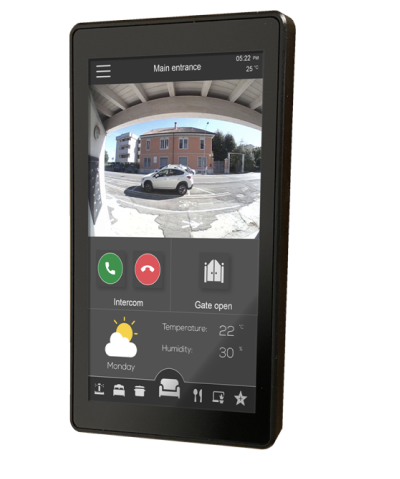
ThinKnx K2 is the most powerful device of the Trend Line serie. With a high resolution capacitive screen (720x1280) and a simple but elegant design it is the perfect solution, both as a stand-alone KNX controller for small installations, and as ProLine client or server for larger buildings. The integrated temperature and humidity sensors allow it to be used as a thermostat. It can also be used as an internal intercom or intercom station. It allows remote control of the system via the dedicated Thinknx Trendline app. It can only be mounted portrait only.
Available Upgrades

DoorCom and PBX
It allows ThinKnx clients to receive VoIP calls coming from devices with VoIP technology, such as VoIP telephones, IP intercoms (TCS, 2N, Mobotix). It also enables the VoIP PBX (SIP Server) function that handles VoIP calls on the server. It allows to manage the doorcom functionality between different devices with ThinKnx interface installed. Integration of SIP VoIP door stations for Windows, iPad, iPhone and Android clients.
Built-in Features
Direct KNX connection
Linux-based appliance with direct connection to the KNX bus (no need of a separate IP-router).

Unlimited clients
An unlimited number of clients (PCs, smartphones or tablets) can simultaneously connect to the server.

Unlimited KNX datapoints
There are no limitations on the number of KNX entities that can be controlled by our servers.

Electrical switching
Different kinds of switches are available: on/off normally open, on/off normally close, on on pressure/off on release, on on pressure, value on pressure, etc.

Dimming regulation
Lights can be easily dimmered through a simple interface of the client app.

RGB led
RGB leds can be controlled through KNX.

Blinds control
Rollers and blinds contain KNX groups to move, stop and obtain a feedback from shades, blinds, etc.

Heating & Cooling
The chronothermostat is used to interact with a KNX thermostat and allows to set weekly timers to control the temperature. The desired temperature can also be hourly and/or daily set.

Generic timers
Switching can be timed in two modes: the “Calendar” mode allows you to define complex timings while the “Switch Schedule” mode allows you to set six weekly timings.

Weather forecasts
Weather forecast can be displayed into the client application.

Loads control
The load control allows to monitor the electric energy consumption following disarming thresholds and rearming intervals.

Scenes management
The Scene is a sequence of programmed actions such as turning on the lights in a room. Such list of actions can be predefined by the user through the recording function of the Scene.

Logics & maths
Logical operations (AND, OR, XOR) and mathematical functions based on values coming from KNX groups can be created through simple and intuitive interfaces.

Analog values
It is possible to visualize analog values in the client interface (e.g.: weather data such as wind speed, outdoor temperature, etc.) and send them to a KNX group (for example to adjust threshold values).

IP cameras
Visualization of IP cameras with MJPEG or RTSP video flow.

Voice control
It allows to send vocal commands to monitor the plant either directly through Siri (for iOS devices) or through the IFTTT service.

Push notifications
The management of technical alarms can be done with push notifications (iOS), emails and automatic page change in the ThinKnx client interface.