BACnet

The Thinknx system allows the integration of devices and data points through the BACnet protocol, enabling bidirectional communication with external systems and the import of data into the supervisor.
Through this object, it is possible to configure BACnet communication, acquire the available points and use them for control, visualization and integration with other systems, such as KNX.
System limits
The maximum number of BACnet points supported by a Thinknx server depends on the server model.
| Thinknx server | Maximum BACnet points |
|---|---|
| Micro | 500 |
| Compact | 1,000 |
| Rack | 5,000 |
The indicated limit applies to each individual server.
Communication
 The communication section allows you to configure the connection with the BACnet network. It is possible to select the connection type between communication port, IP connection or WebSocket, depending on the device or infrastructure used.
Connection parameters, such as IP address, port and BACnet identifiers, must be configured correctly to allow data exchange. Once communication is enabled, the system is able to send and receive values, as well as query devices to retrieve the available points.
The following properties allow you to configure the communication:
- Communication Type: Selects the connection mode:
- Communication Port
- IP
- WebSocket
- Connection Parameters: Parameters required for BACnet communication:
- IP Address
- Port
- BACnet Identifiers
- Enable Communication: Enables communication with BACnet devices.
Once communication has been configured correctly, the system will be able to:
- Send data to BACnet
- Receive data from BACnet
- Read the available points
Address Space

The Address Space section allows you to explore the structure of BACnet devices and identify the available objects and properties.
Using the button with the book icon, it is possible to query the device and automatically retrieve the property names, making it easier to identify the points. This function also allows you to browse through the objects and perform targeted searches, simplifying the system configuration.
Object Properties
Once the properties of interest have been identified, they can be added as inputs within Thinknx. This step is necessary to make the data available to the system and to use it in logics or in the supervisor.
During configuration, it is possible to assign a write priority according to the BACnet logic. The BACnet protocol includes a priority system that determines which value must be considered valid when multiple sources write to the same object.
Priorities are organized into numerical levels from 1 to 16, where the value with the highest priority always takes precedence. This mechanism allows override situations to be managed correctly, for example between manual commands, automatic logics or external systems.
BACnet Points

The BACnet Points section collects all the available points acquired from BACnet devices. After communication has been established, the desired points can be imported into the Thinknx project.
BACnet Objects
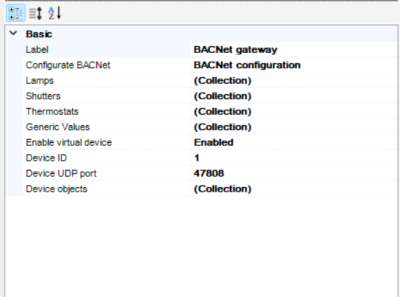
In order to use BACnet points within the supervisor, the related objects must be created. The acquired points, in fact, represent only raw data and cannot be used directly at graphic level until they are associated with system objects.
Once created, these objects can be used for control, visualization and integration with other systems.
Lights (BACnet Lamps)
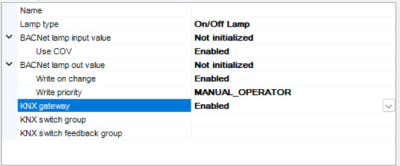
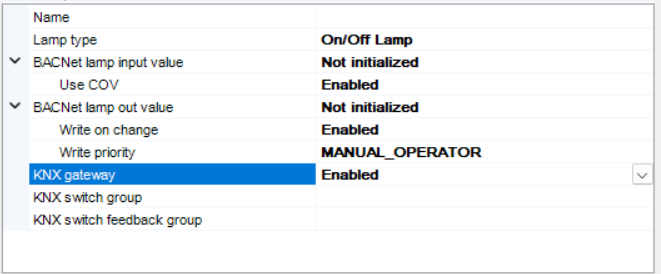
The BACnet Lamps section allows you to create and configure light objects based on BACnet points.
During configuration, it is possible to define the lamp type, distinguishing between an On/Off light, a dimmable light or a proprietary type. Based on the selected option, the system automatically adapts the available properties.
The BACnet input and output values respectively represent the light status and the command sent to the device. Integration with KNX can be enabled through a gateway, allowing group addresses to be associated for both command and status feedback.
In the case of dimmable lamps, additional properties are made available for managing the brightness level. It is possible to define a KNX group for value setting, one for dimming control and one for feedback, allowing complete management of the light intensity.
Shutters (BACnet Shutters)
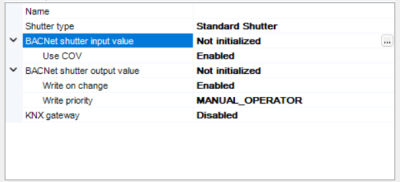
The BACnet Shutters section allows you to configure shutter objects based on BACnet.
It is possible to define the shutter type, such as a standard shutter or a proprietary device. The BACnet input and output values represent the shutter status and command.
Through KNX integration, it is possible to associate groups for movement, stop and positioning. Groups for position feedback are also available, allowing the supervisor to keep the status synchronized.
In the case of devices equipped with slats, additional dedicated properties are enabled. These allow both the command and feedback of the slat position to be managed, offering more advanced control typical of Venetian blinds.
Thermostats (BACnet Thermostats)
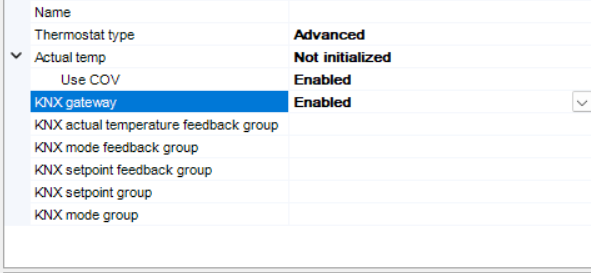
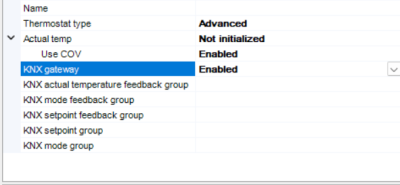 The BACnet Thermostats section allows you to configure thermostat objects based on BACnet.
It is possible to define the thermostat type and associate the actual temperature value coming from the BACnet device. KNX integration allows the main thermostat parameters to be connected, such as current temperature, setpoint and operating mode.
Through KNX groups, both commands and feedback can be managed, ensuring synchronization between BACnet, the supervisor and the KNX system.
Generic Values
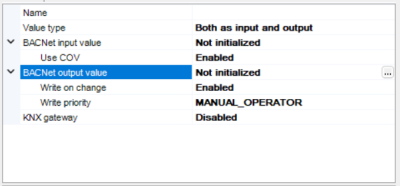
The Generic Values section allows you to manage generic BACnet values that are not associated with specific objects.
It is possible to define whether the value must be used for reading, writing or both. The input and output fields respectively represent the data received from BACnet and the data sent to it.
This function is particularly useful for integrating non-standard points or for implementing custom logics without having to create specific objects.
Virtual Devices
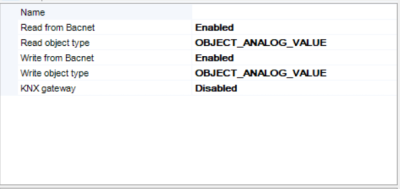
The Virtual Devices section allows you to create virtual BACnet objects for data exchange between Thinknx and the BACnet network.
It is possible to enable reading and writing and define the associated BACnet object type. These devices allow internal Thinknx variables to be exposed as BACnet objects, or data to be received from other devices.
This function is particularly useful for simulating devices or for integrating systems that do not directly provide physical BACnet objects.
- bacnet.txt
- Last modified: 2026/09/22 08:38
- by francesco